
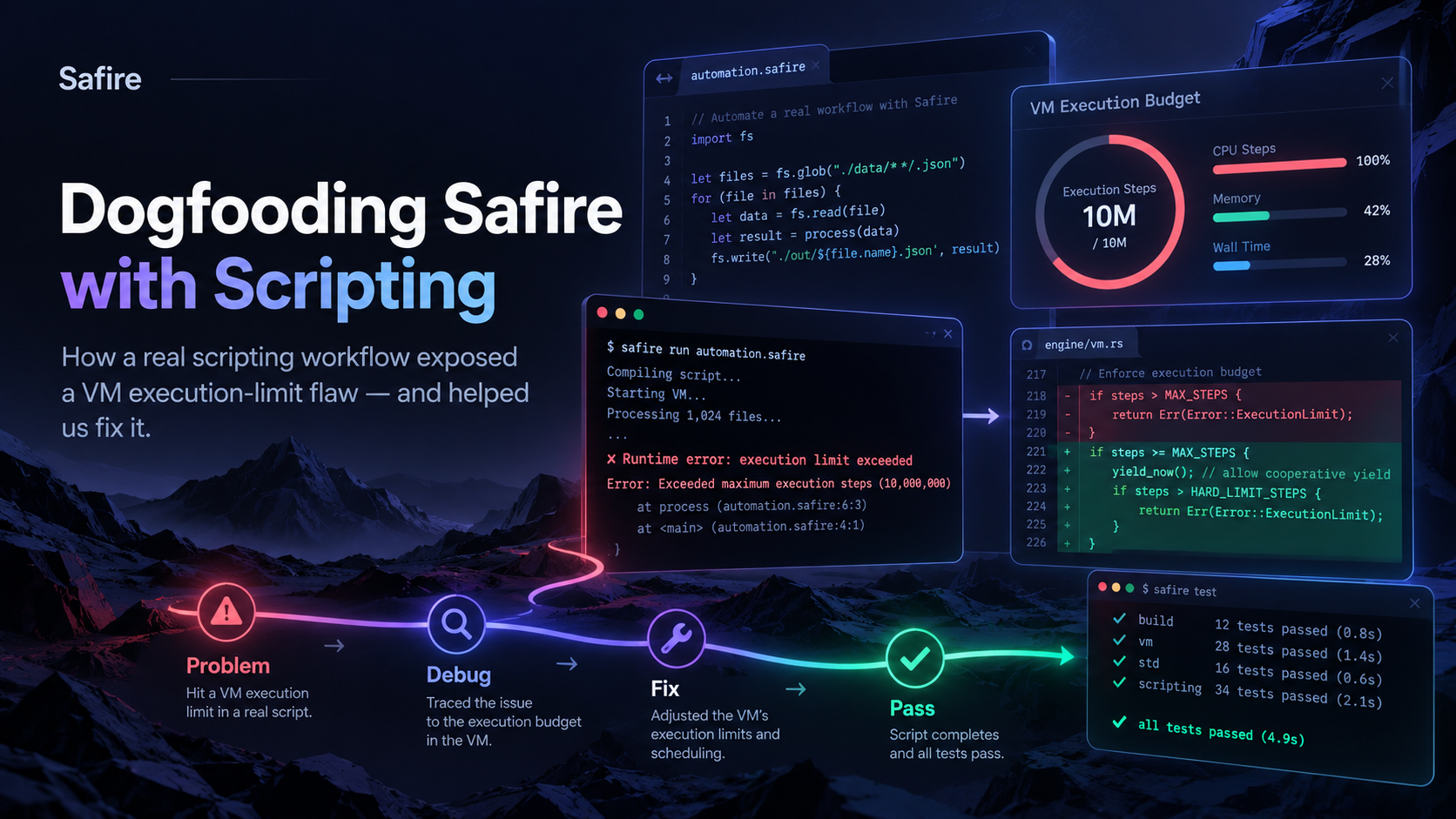
How using Safire to build Safire exposed a VM limitation — and helped us fix it
One of the principles behind Safire is simple:
If Safire is going to be a serious development and automation platform, we should be able to use Safire itself to build, test and maintain Safire.
That is exactly what we have started doing.
Instead of relying entirely on PowerShell, Python or other external scripting tools for our internal development workflows, we are increasingly using Safire scripts to automate Safire development itself.
That includes tasks such as:
- checking project state
- validating Source Vault checkpoints
- inspecting source files
- copying and applying controlled changes
- configuring builds
- launching CMake and Ninja
- running focused test suites
- starting local services
- running browser acceptance tests
- checking that protected source areas were not modified
- collecting build and test evidence
In other words, Safire is becoming one of the tools we use to develop Safire.
That is what we mean by dogfooding Safire.
And recently, that dogfooding exposed a real problem in the Safire virtual machine.
Moving our development scripts into Safire
For a long time, development automation tends to accumulate around whatever tools are easiest to reach.
On Windows that often means:
CMD
PowerShell
Python
batch files
custom utilities
Those tools work, but our long-term goal for Safire is different.
If Safire is meant to be a language for business software, automation, scripting, services and tooling, then a Safire developer should not need to switch languages every time they want to automate something.
So we have been deliberately moving more of our own engineering workflows into .sf scripts.
A typical package now looks more like:
run.cmd
workflow.sf
The CMD file exists only to do the small amount of Windows bootstrapping that is unavoidable, such as setting up the Visual Studio toolchain.
The real workflow lives in Safire.
For example, the Safire script may:
Verify the current Source Vault checkpoint
Check hashes of protected source files
Inspect the current source tree
Run CMake configuration
Build Debug
Build Release
Run focused tests
Launch a local server
Start browser acceptance tests
Verify that no protected source changed
Produce a final PASS/FAIL result
That is already a substantial automation workload.
And that is exactly how we found the VM issue.
The failure
While running one of these real Safire automation scripts, the workflow stopped with:
S3VM_EXECUTION_LIMIT
VM execution limit exceeded.
At first sight, this looked like the VM doing what it was supposed to do.
Execution limits are important.
Without them, a script such as:
While True
End
could potentially run forever.
So some form of execution protection is absolutely necessary.
The problem was that our script was not stuck in an infinite loop.
It was doing legitimate work.
It was inspecting files, running processes, checking results and orchestrating a fairly large development workflow.
That immediately raised a more important question:
Was Safire protecting us from a runaway script, or was the execution model simply too restrictive for real automation?
We stopped the development work at that point and investigated the VM itself.
What we discovered inside the VM
The answer was very specific.
The VM had a hard-coded execution counter.
Conceptually, the old behaviour looked like this:
fuel = 0
max_fuel = 100000

while executing instructions
    fuel++

    if fuel > max_fuel
        fail with S3VM_EXECUTION_LIMIT
That protection had originally been perfectly reasonable.
It prevented a Safire procedure from executing an unlimited number of VM instructions.
But once Safire started being used for serious automation, the weakness became obvious.
There was essentially one fixed idea of how much execution was acceptable.
A small interactive script and a large build automation workflow were being judged using the same basic execution model.
There was another important detail.
The instruction counter was associated with execution inside a function rather than representing a richer execution-wide budget.
That was adequate for the earlier VM, but not the right model for where Safire scripting was heading.
We did not remove the limit
The easy fix would have been:
100000becomes:
100000000and continue working.
We deliberately did not do that.
Simply making a limit enormous is not really fixing the architecture.
And removing the execution limit entirely would have been worse.
Instead, we changed the VM so that execution limits become a proper execution-budget system.
The guiding principle became:
Different Safire workloads may need different budgets, but safety remains enforced.
Execution profiles
The VM now understands different execution profiles.
Conceptually:
Default
Interactive
Automation
Test
Custom
Default
Used for normal Safire execution.
It retains normal protection against accidental runaway code.
Interactive
Suitable for short commands, expressions and other quick execution.
Automation
Designed for exactly the kind of internal workflow that exposed this issue.
An automation script may legitimately:
walk directories
hash files
start compilers
wait for build tools
run tests
launch services
collect output
process logs
start browsers
That is fundamentally different from a tiny interactive expression.
Test
Allows the Safire runtime itself to be tested with deliberately small execution budgets.
For example, we can run a script with a tiny instruction limit and prove that the VM stops it correctly.
Custom
Allows explicit execution-budget settings when a specific workload requires them.
Not all limits mean the same thing
The dogfooding exercise also forced us to separate several concepts that should never have been treated as one thing.
Safire now distinguishes between things such as:
VM instruction budget
wall-clock execution time
native calls
recursion depth
cancellation
These are related, but they are not the same.
That distinction becomes especially important when a script launches another process.
Consider:
Process.Run("cmake", arguments)CMake may run for several minutes.
During that time, Safire itself is not executing millions of VM instructions.
It is waiting for an external process.
A good VM therefore should not behave as if:
five minutes waiting for CMakeis equivalent to:
five minutes spinning through Safire bytecodeThose are completely different runtime behaviours.
That is now reflected in the execution-budget design.
Native waits should not consume fake VM work
One of the most important tests we added was specifically for this.
A Safire script starts a native process which waits for a known period.
The test then verifies that:
wall-clock time increasesbut:
VM instruction usage does not artificially explodeThat sounds obvious when written down.
But this is exactly the sort of distinction that tends to appear only when a language starts being used for real work.
And that is one of the major benefits of dogfooding.
Better diagnostics
The original failure told us only:
VM execution limit exceeded.That is technically true, but not particularly useful.
A mature development platform should tell the developer what happened.
The new execution-budget design can provide information such as:
Execution profile
Instructions executed
Instruction limit
Elapsed time
Native calls
Recursion depth
Source location
Procedure
So instead of merely saying:
You hit a limit.the runtime can explain:
which limit
how much was consumed
where execution was
which execution profile was active
That turns a runtime guard into a useful diagnostic.
The command line now understands the workload
This also means Safire’s script runner can explicitly select an appropriate execution profile.
For example:
safirec.exe --run build.sf --execution-profile automationThe important distinction is that this does not mean:
turn safety offIt means:
run this script using the defined Automation execution policyThe safeguards are still there.
The budget is simply appropriate for the workload.
How we tested the fix
Because this issue affected the VM itself, we did not consider the change complete just because our original script started working.
We ran the updated runtime through both Debug and Release builds and exercised the relevant VM and scripting tests.
The verification included:
Default execution profile
Automation profile
Test profile
Custom budgets

Finite instruction protection
Infinite-loop protection
Native-wait instruction accounting
Wall-clock budget
Native-call budget
Recursion protection
Cancellation

Diagnostic reporting
CLI profile selection
CLI budget overrides

Existing VM regression tests
Safire scripting regression tests
And importantly, the original type of automation workload now passes under the Automation profile.
The final runtime validation completed with:
S3_VM_EXECBUDGET_HF1=PASSWhy this matters to Safire developers
The immediate bug is fixed, but the bigger implication is more interesting.
Safire scripting is becoming a real platform capability
We are no longer only asking:
Can Safire execute a script?
We are increasingly asking:
Can Safire reliably automate an entire development workflow?
Those are very different levels of maturity.
The VM issue appeared because our scripts are becoming substantial enough to expose real runtime behaviour.
That is progress.
Safire can increasingly replace external scripting glue
The goal is not to ban PowerShell, Python or CMD.
Those tools will always have their uses.
But a Safire developer should increasingly be able to remain in Safire for workflows such as:
build automation
deployment
database maintenance
file processing
service management
testing
web automation
development tooling
business automation
The same language used to build the application can also be used to automate the work surrounding that application.
That is a significant part of the Safire vision.
Dogfooding changes how we design features
There is a big difference between designing a scripting system theoretically and relying on it for your own work.
When your own build process depends on it, inconvenient behaviour stops being theoretical.
If a feature is awkward, we experience the awkwardness.
If diagnostics are weak, we have to debug them.
If the runtime has an artificial limitation, our own work stops.
That creates a very healthy engineering pressure.
Instead of saying:
That limitation is probably acceptable.we have to ask:
Would we accept this if we were a Safire developer using the product every day?In this case, the answer was no.
So we fixed it.
A small failure with useful consequences
The original VM failure interrupted another piece of development work.
That was inconvenient.
But it also gave us something valuable.
Because we were using Safire itself, we discovered an execution-model limitation before it became someone else’s problem.
And instead of working around it, we improved:
the VM
the script runner
execution profiles
runtime diagnostics
budget accounting
testing
That is exactly what we want dogfooding to achieve.
Building Safire with Safire
This is increasingly how we want the project to evolve.
Safire should not merely be the language our users are expected to trust.
It should be a language that we trust enough to use ourselves.
Every time we replace another piece of internal development glue with a Safire script, we exercise the language, runtime and libraries in a way that synthetic examples cannot.
Sometimes that will expose problems.
That is a feature of the process, not a failure of it.
Because every one of those problems gives us an opportunity to make the platform stronger before developers depend on it in production.
That is dogfooding.
And in this case, dogfooding Safire scripting made the Safire VM better.
Leave a Reply